Editable Medical Planner Canva Template
Managing health isn’t just about doctor visits—it’s daily consistency, thoughtful tracking, and having the right tools at your fingertips. The Editable Medical Planner Canva Template bridges that gap: a fully customizable, print-ready digital planner designed for real-life complexity—whether you're juggling chronic conditions, supporting aging parents, launching a wellness brand, or simply reclaiming control over your own care.
This isn’t a static PDF you print once and outgrow. It’s a living document—built in Canva, optimized for KDP, and ready to upload as a professional interior file. You get instant access to a polished, high-resolution layout that prints cleanly on standard 8.5" x 11" paper—and adapts seamlessly to home use, clinical offices, telehealth practices, caregiver teams, or small wellness shops.
Why This Planner Fits Real Needs—Not Just Trends
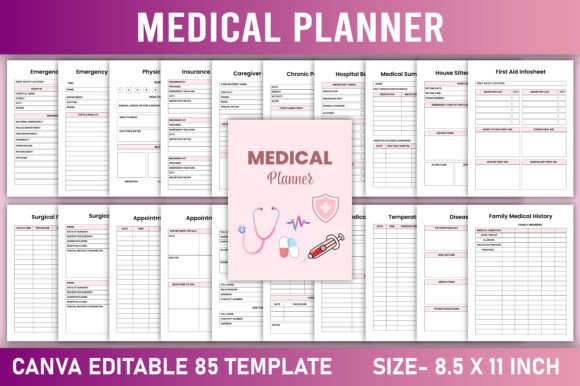
Most medical planners fall into two categories: oversimplified (missing critical trackers) or overwhelming (cluttered with redundant pages). The Editable Medical Planner Canva Template avoids both traps. Every section serves a documented purpose—from Blood Pressure Tracker and Glucose Tracker for routine monitoring, to Caregiver Instructions and Hospital Bag Checklist for urgent preparedness. There’s no filler. Just 40+ carefully curated pages, grouped by function and tested for intuitive flow.
What makes it truly adaptable? You’re not locked into preset colors, fonts, or layouts. Swap serif for sans-serif headings to match your brand voice. Adjust background tones to reduce eye strain for long-term use. Replace stock icons with custom illustrations—or remove them entirely. Even the Emergency Contacts page can be reformatted into a vertical fold-out for quick reference in a clinic binder.
Where It Adds Tangible Value
For healthcare professionals: Use it as a patient onboarding tool—customize the Medical Condition and Medication Tracker sections to align with your specialty (e.g., diabetes management, post-op recovery, mental health intake). Add your logo to the Belongs To page and distribute printed copies during consultations.
For content creators & publishers: This template is KDP-optimized—meaning bleed, margins, and typography meet Amazon’s strict interior guidelines. No reformatting needed. You can publish under your own imprint, add affiliate notes in the Supplements section, or bundle it with a companion guide on managing autoimmune conditions.
For caregivers & families: The Chronic Pain Tracker, Mood Tracker, and Symptoms Tracker aren’t isolated logs—they cross-reference. Spot patterns across sleep, hydration (Water Tracker), and period cycles (Period Tracker) without flipping between apps. Print the First Aid Infosheet and laminate it for the kitchen wall. Pin the Emergency Hospital Visit page inside a child’s school folder.
For entrepreneurs & educators: Repurpose the 15 Day Exercise Challenge and Diet sections into a client-facing wellness challenge. Embed your coaching philosophy into the My Health Goals page using guided prompts—not blank lines. Use the Medical Expenses and Insurance Information spreads to teach financial literacy in adult education workshops.
Design Strengths That Support Long-Term Use
The Editable Medical Planner Canva Template prioritizes usability over aesthetics—but doesn’t sacrifice either. Grid-based layouts ensure alignment stays crisp when resizing text. High-contrast color options (like charcoal text on soft ivory) reduce fatigue during handwritten entries. Page numbering is consistent but unobtrusive. And because it’s built in Canva—not Illustrator or InDesign—you don’t need design expertise to adjust spacing, swap icons, or translate a page into Spanish for bilingual clients.
It also anticipates real-world friction points. The Lab Test Results and Blood Test Results pages include space for both numeric values *and* provider comments—not just checkboxes. The Vision Examinations tracker accounts for OD/OS notation and pupillary distance. Even the Food Diary leaves room for portion estimates and hunger ratings—not just meal names.
Practical Considerations Before You Customize
Start with your primary use case. If you’re publishing on KDP, test print the first 10 pages on your home printer—check for margin clipping, especially near the spine gutter. For professional clinics, consider adding a discreet footer with your practice name and website on every third page (Canva’s “Master Page” feature makes this effortless).
When editing fonts, stick to Canva’s system-safe options (like Inter, Lato, or Open Sans) if you plan to export as PDF for others to fill digitally. Avoid decorative typefaces in trackers where legibility matters most—like the Medication Tracker or Immunization Chart.
Remember: customization doesn’t mean starting from scratch. Use Canva’s version history to save “base,” “client-ready,” and “print-optimized” versions. Duplicate the Habit Tracker page and rename it “Hydration + Mobility” for physical therapy clients—or merge Mood Tracker and Sleep Tracker into one dual-axis chart for mental health practitioners.
More Than a Planner—A Consistency Framework
The Editable Medical Planner Canva Template works because it respects how people actually engage with health data—not in perfect weekly rhythms, but in bursts of intention followed by weeks of maintenance. That’s why it includes both the Yearly Medical Planner (for big-picture scheduling) and the 15 Day Exercise Challenge (for short-term motivation). Why it pairs Physical Need with Meditation Log. Why Emergency Contacts appears twice—once in the front, once laminated and clipped to a keychain.
You won’t find vague affirmations or empty journal prompts here. What you will find is structure that adapts—without demanding perfection. A blood pressure log that fits on a Post-it-sized sticky note. A medication tracker that accommodates PRN doses *and* timed prescriptions. A Specialist Details page that captures referral dates, portal login hints, and parking instructions—not just phone numbers.
Whether you're building a wellness business, navigating complex care, or designing resources for underserved communities, this template gives you authority over format—not just content. Download the Medical Planner instantly. Get the PDF + editable Canva link. Then make it yours: in color, in voice, in purpose.