Editable Craft Project Planner Canva: Your All-in-One Creative Organization Tool
Whether you're stitching custom quilts in your sunlit home studio, managing a small batch candle-making business, or juggling freelance design projects alongside client deadlines, staying organized isn’t just helpful—it’s essential. The Editable Craft Project Planner Canva bridges the gap between inspiration and execution by offering a flexible, professional-grade planning system designed specifically for makers, creators, and creative entrepreneurs.
What Is the Editable Craft Project Planner Canva?
It’s not just another printable PDF—it’s a fully customizable digital planner built for real-world craft workflows. Delivered as a high-resolution, print-ready KDP interior file (PDF) paired with an editable Canva link, this planner gives you the freedom to adapt every page to your unique process. No design skills required—just open the Canva template, swap fonts, adjust colors, insert your logo, update layouts, or add personal photos and textures. Then download your polished version as a crisp, bleed-free PDF ready for Amazon KDP publishing—or print it at home, the office, or your local copy shop.
Why Makers Love This Planner (Beyond the Pretty Pages)
Unlike generic planners that treat crafting like generic task management, the Editable Craft Project Planner Canva understands the rhythm of creative work: the research phase, material sourcing, iterative prototyping, deadline pressure, client feedback loops, and inventory tracking—all in one cohesive system.
A Planner Built for Real Creative Workflows
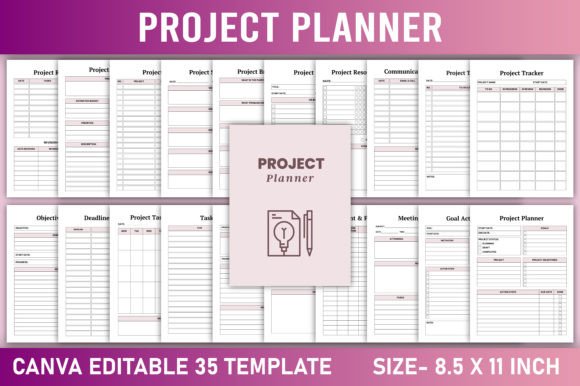
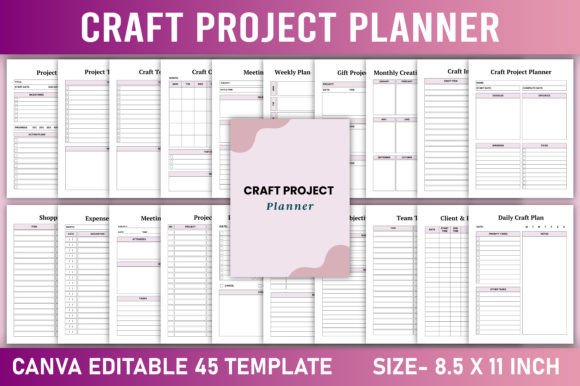
Inside, you’ll find 30+ purpose-built pages—including:
- Project Planner & Tracker — Map scope, milestones, resources, and team roles for each craft initiative.
- Craft Calendar & Weekly At-a-Glance — Visualize deadlines, craft fairs, photo shoots, and shipping windows side-by-side.
- Creative Supplies Log & Craft Inventory — Track yarn weights, fabric bolts, resin batches, or tool maintenance—no more last-minute supply panic.
- Gift Projects Tracker & Expenses Tracker — Separate personal commissions from business income, log materials costs, and calculate true project profitability.
- Vision Board & Bucket List — Keep long-term dreams visible—not buried in a notes app.
- Communication Tracker & Client Project Log — Record email timestamps, call summaries, and revision requests without losing context.
Each section flows into the next. Sketch an idea on the “Sketch Your Craft Ideas” page, then move it to “Creative Goals,” assign deadlines in “Deadlines Tracker,” budget it in “Project Budget,” and track progress in “Team Task List.” It’s workflow continuity—not fragmentation.
Who Benefits Most From This Planner?
The Editable Craft Project Planner Canva serves a surprisingly wide range of users—because creativity wears many hats.
- Home-based crafters who sell at farmers’ markets or Etsy—and need to balance family time, production, and admin without burnout.
- Small creative businesses (e.g., embroidery studios, woodworking shops, soap makers) managing multiple SKUs, seasonal launches, and vendor orders.
- Teachers and workshop facilitators organizing lesson plans, material kits, student progress, and event logistics.
- Freelance designers & illustrators juggling client briefs, asset libraries, licensing terms, and invoice timelines.
- DIY hobbyists building confidence through structured goal-setting—like “Complete 3 cross-stitch samplers by December” or “Launch first Patreon tier in Q2.”
Real-World Use Cases You’ll Recognize
Case 1: The Seasonal Candle Maker
Every October, Maya stocks up on soy wax, wicks, and fragrance oils—but often overbuys lavender and underestimates vanilla demand. With the Craft Inventory and Shopping List pages, she now reviews past sales data, logs current stock levels, and creates targeted online shopping lists. Her “Gift Projects Tracker” helps her pre-plan holiday bundles, while the “Expenses Tracker” reveals which scents actually drive margin—not just volume.
Case 2: The Quilt Guild Organizer
David coordinates bi-monthly workshops, guest speakers, and charity drives. He uses the “Meeting Notes” and “Communication Tracker” to log action items after each session—and shares the “Weekly Plan” page with co-organizers via Canva’s real-time collaboration. When he added his guild logo and swapped the palette to warm terracotta tones, members said it “finally felt like *our* planner.”
Case 3: The First-Time KDP Publisher
Lena created a coloring book inspired by botanical prints. She used the “Project Index,” “Resource Planner,” and “Vision Board” pages to outline her launch timeline, track illustrator revisions, and curate Pinterest-worthy mood boards. Because the final PDF was KDP-ready (CMYK-safe, 300 DPI, proper margins), her interior uploaded flawlessly—and she published in under 48 hours.
Strengths That Set It Apart
- True Customization — Change fonts, colors, logos, and backgrounds *without* needing Photoshop or Illustrator.
- KDP-Ready by Design — No resizing, no bleed fixes, no font substitution warnings—just upload and publish.
- Print-Optimized & Digital-Friendly — Works beautifully on paper (for tactile planners) and on tablets (for quick edits or note-taking).
- No Subscription, No Lock-In — You own the Canva link and PDF forever. Duplicate templates, archive old versions, share with collaborators.
Practical Considerations Before You Begin
This planner shines when used intentionally—not as a passive decoration. A few realistic expectations help maximize value:
- Time investment pays off — Spend 20 minutes setting up your first project in the “Project Planner” page, and you’ll save hours later avoiding rework or miscommunication.
- Canva familiarity helps—but isn’t required — Basic drag-and-drop editing is all you need. Free Canva accounts work perfectly; Pro unlocks extra fonts and brand kits (optional).
- Not a replacement for accounting software — While the “Bank Account” and “Expenses Tracker” pages support quick logging, serious bookkeeping still benefits from QuickBooks or Wave.
- Designed for clarity—not clutter — Some users expect 100+ pages. Instead, this planner focuses on high-leverage sections that reduce cognitive load—not add to it.
How to Get Started—Fast
- Download the “Craft Project Planner” instantly — Receive both the print-ready PDF and your unique Canva edit link within seconds.
- Open the Canva template — Customize colors, fonts, and layout to match your brand or personal style.
- Fill in your first project — Start with “Project To Do List” or “Daily Craft Plan”—no need to complete everything at once.
- Print, bind, or use digitally — Many users print quarterly covers and spiral-bind sections for durability.
- Revisit weekly — Use “Week At A Glance” every Sunday evening to align priorities before Monday morning hits.
Your Creative Process Deserves Better Tools
Organizing craft work shouldn’t mean choosing between rigid spreadsheets and whimsical but impractical journals. The Editable Craft Project Planner Canva delivers structure with soul—professional enough for client-facing deliverables, warm enough for midnight sketch sessions. It respects your time, honors your vision, and grows with your practice—whether you’re launching your first Etsy shop or scaling a multi-state artisan collective.
You don’t need perfection to begin. You just need a place where ideas land, tasks get assigned, supplies get counted, and progress becomes visible—one thoughtful, editable page at a time.